

Pages

Showing posts with label google. Show all posts

7 GoogleAdsenseGuide How to apply for Google Adsense


To get an adsense account it is very easy and you can apply for this service without any hesitation. The instructions are very simple. Just follow the following instructions that you can easily create an adsense account.
1.First of all open your Internet Browser (IE or Firefox. etc) and type the following URL in
Address bar
http://www.google.com/adsense
2.Now you can see a website will open that is necessary to create your account on right side you will see a BLUE button which display a message on it called "Signup Now" Just click on it.
3.An application form will open that is requiring your full information to create adsense add count you should put the right information about you in this form. At last you see an agreement please also read it.
4.After writing full information click on the "Submit Info" then your form will submit.
5.At last Google shall verify your website if your website meet the requirements of Google then it will be very grateful for you. Then Google send you an E-mail regarding Adsense Account information and you will be able to handle your account.


Read more »

oLatest Google Chrome 4

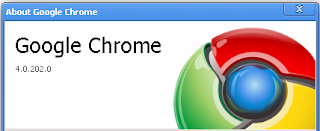
Download Google Chrome 4 Seems that Google is upgrading Chrome browser versions at a faster rate than competitors like Firefox,IE and Safari . The application already entered the phase four of development by the release of Google chrome 4 . We earlier covered the release of Google Chrome 3 that added support for extensions to Chrome browser .While the stable version continues as Chrome 2 , Google Chrome 3 and and Chrome 4 are faster and offer extensive features . Changes in Google chrome version 4 are bookmark synchronization , faster JavaScript engine ,improved support for new HTML 5 tags and bug fixes from previous versions . There is no changes in external appearance and position of controls and settings .But you will notice a faster page load and improved rendering of script intensive pages . Developers and enthusiast can download Google chrome 4 here .

Download Now


Read more »

Google Chrome 33 Offline Standalon Installer

 Google Chrome 33 Offline Standalon Installer


Google is smarting: with the recent release of Internet Explorer 10, Microsoft has stolen a march on its rivals in the browser market for the first time. The slimmed down user interface and faster loading times are a direct threat to Chrome’s major selling points, which is why Chrome has quickly found itself pushed into development.

Whilst version 11 added support for Google Instant, which anticipates what URLs and search terms youre going to enter by loading web pages as you start typing. You can also now see the sign-in page for Google Cloud Print service, which will eventually allow you to print over the internet to compatible printers from wherever you are. Chrome 10 also adds built-in sandboxing of the Adobe Flash Player plug-in for security reasons to help block potential malicious Flash code from gaining a foothold on your system.

Chrome 12 and 13 were mostly about performance improvements.

Google Chrome 14 offered a host of new features including the Native Client, which will enable developers to build powerful web apps that combine code thats run locally (and securely through a double sandbox) in association with web-based code to provide improved online gaming, media and other intensive applications.

Chrome 16 offered multi-user support, so you can use one browser in one user profile and simply log in and out to access your bookmarks and browsing history.

More recent upgrades that brought tab synchronisation across devices. An example: say youre at your work computer, booked a restaurant, but forgotten to print directions, left work and forgotten the name of the restaurant. It happens. With tab synchronisation, you just need to power up your laptop or Android device, open Chrome and you should see the tabs from your desktop computer automatically open on your mobile device.

Chrome 30 brings improved searching by image, a number of new apps/extension APIs, plus improved stability and performance

More software
Adobe Creative Cloud
Corel WinDVD
Chief Architect X6
 
Password: "www.download.ir"


Download Now


Read more »

Google Chrom free download


Read more »

Google Desktop free download full version


Google Desktop makes searching your computer as easy as searching the web with Google. Its a desktop search application that provides full text search over your email, files, music, photos, chats, Gmail, web pages that youve viewed, and more. By making your computer searchable, Desktop puts your information easily within your reach and frees you from having to manually organize your files, emails and bookmarks.

Google Desktop doesnt just help you search your computer; it also helps you gather new information from the web and stay organized with gadgets and sidebar. Google Gadgets can be placed anywhere on your desktop to show you new email, weather, photos, personalized news, and more. Sidebar is a vertical bar on your desktop that helps you keep your gadgets organized.

Other features include:

Quick search box
Smart indexing
Multiple file types
Find deleted files
Deskbar and floating deskbar
Lock search
Microsoft Outlook integration


Read more »

6 GoogleAdsenseGuide Google Adsense Supported Languages


Google AdSense supports publishers in several different languages. Applications for participation in the program can be for sites with content primarily in:

Arabic
Italian
BulgarianJapanese
Chinese (simplified)Korean
Chinese (traditional)Norwegian
CroatianPolish
CzechPortuguese
DanishRomanian
DutchRussian
EnglishSerbian
FinnishSlovak
FrenchSpanish
GermanSwedish
GreekThai
HebrewTurkish
Hungarian 

In addition, AdSense for search is available in Indonesian and Vietnamese. These languages are not supported for AdSense for content pages.
You can select your sites primary language during the application process. If youre approved, AdSense will serve relevant ads to your pages in the appropriate language, even if your site contains multiple supported languages.


Read more »

Download Google SketchUp Pro 8 0 15158 Full Key Keygen Serial Number Patch


Google Sketchup Pro 8 (with LayOut 3) is now available for purchase or upgrade in English, French, Italian, German and Spanish. You can find out all about the great new features in this short video. Its really quite simple to upgrade from previous versions of SketchUp Pro to the latest one: If you have an active license for SketchUp Pro 7 (or 6, 5, 4, 3, 2, or 1) you can upgrade it to a SketchUp Pro 8 license through our online store. Once youve purchased your new, upgraded license, youll receive an email with two important pieces of information:

1. A link to download Google SketchUp Pro 8 (if you havent already)
2. License information you need to authorize your software

If you’d like to try it out before upgrading, please feel free to download an eight-hour trial from our website.

Here are some more things to keep in mind:
  • The cost to upgrade each license is US$95, EU€83 or UK£68.
  • Please have your current serial number, registered user and company name available when you visit the upgrade portion of our store.
  • If you do not have your current serial or authorization number, follow these instructions to locate and retrieve them.
  • If you have any trouble upgrading, please visit our Help Center for more detailed instructions.
  • If you purchased a SketchUp Pro 7 license on or after August 1, 2010, the upgrade fee is waived as long as you upgrade on or before November 1, 2010.
  • If you have an EDU license that is not yet expired, your SketchUp Pro 8 upgrade is free.
  • If you purchased a SketchUp Pro license through one of our authorized resellers, please contact that reseller directly for upgrade terms.
  • If you have a need to contact us through the Help Center in the near future, please keep in mind that while we do get a little bogged down at release time, we will do our best to get back to you as as quickly as possible. 


Google SketchUp Pro 8.0.15158 Main Features:


• Edges and Faces: Thats all there is to it
• Push/Pull: Quickly go from 2D to 3D
• Accurate measurements: Work with precision
• Follow Me: Create complex extrusions and lathed forms
• Paint Bucket: Apply colors and textures
• Groups and Components: Build smarter models
• Shadows: Perform shade studies and add realism
• Sections: See inside your models
• Scenes: Save views and create animations
• Look Around and Walk: Explore your creations firsthand
• Dimensions and Labels: Add information to your designs
• The Instructor: Catch on quickly
• Layers and the Outliner: Stay organized
• Google Earth: See your models in context
• Sandbox tools: Work on terrain
• 3D Warehouse: Find models of almost anything you need
• Import DXF, DWG and 3DS: Get a headstart on your modeling
• Import images: Paint walls with photos
• Export TIFF, JPEG and PNG
• Export DXF and DWG: 2D line drawings and 3D models
• Export PDF and EPS: 2D vector images
• Export 3DS, OBJ, XSI, FBX, VRML and DAE
Thanks for your continued business and happy sketching!..
DOWNLOAD LINKS
 VIA TURBOBIT
passward: hackrulezz


Read more »

5 GoogleAdsenseGuide Google Adsense add to your Website


How to add Google AdSense to your Website


As a website owner, you may decide that you wish to add Google AdSense advertising to your website.

What is Google AdSense?

You can think of AdSense as a new business opportunity. Its completely free. Yes, its an opportunity for you to make money from your own website. The advertising programme is made up of 2 key elements:
  • AdSense for Content
  • AdSense for Search

    AdSense for Content

    Google AdSense is a quick and easy way for website owners to display Google Ads on their website. When people visit your website and click the Google Ads, you get paid money. Simple!

    The advertising served up by Google is related to what your visitors are looking for on your site. In other words, its context sensitive. For example, if your website is about recruitment, then you can be pretty sure that the presentation of Ads by Goooooogle on your site will also be about recruitment.

    In fact, its even better than that. Google AdSense is looking at the content of each and every web page on your website. So, this means that the content of the Google Advertising will align with the information on each web page in your site.

    Its completely automatic and you dont need to worry about it.


    AdSense for Search

    This feature will allow you to add a Google Search Bar to your own website. So, this means that visitors to your website can use the Google Search Bar and search for information contained in your site.

    And whats more, when a search is performed, the search engine returns Google AdSense advertising in the search results. Once again, its fully automatic and the advertisements are directly related to the search query.

    Now heres the good bit! When people click your Search Ads (these are the sponsored ads), you are paid money. Its a pay per click scheme, so you can make money as people use your search bar.

    For example, if you search for hotels on the moon, this means that the Ads by Goooooogle in the search results will also be about hotels on the moon.

    Dont worry if you are not using search technology directly within your site. Once again, its all taken care of. For example, it will work perfectly well on a simple HTML site.

    Join: Google AdSense 


    Can I use AdSense at Quick on the Net?

    Yes indeed, the www.QuickontheNet.com site-builder supports the use of Google AdSense.

    Yes, you can use both Content and Search in your site and we also provide you with our own site search feature in our websites. In other words, all of our websites come with a free site search tool anyway.


    How do I put Google AdSense on my Website?

    Firstly, you need to SIGN-UP to Quick on the Net and SIGN-UP to Google AdSense.

    Now, log into the AdSense toolkit and go to Content or Search, according to your preference. For example, if you wish to display some advertising in your site, go to AdSense for Content.

    Select your options from:
  • Ad unit or Link unit
  • Format
  • Colours (Colour palettes - select a default palette or create a unique palette for your own website)
  • Your AdSense Code (this is the code you will copy and paste onto your web page)

    Now, log into your toolkit at Quick on the Net and go to:
  • Pages
  • Edit the web page which where you intend to paste in the code
  • Click on <>
  • Paste in the AdSense Code
  • Save the page
  • Simple!


    Now Relax and Make Some Money! 

    Have you done it yet? What are you waiting for? Make Money the Easy Way! 


  • Read more »

    Google Fiber service for Internet and cable TV launched


    Google has launched its Google Fiber service in Kansas City today. The highly anticipated service is aimed at consumers only, and offers gigabit-speed Internet connectivity and cable TV. Google has divided the service into three packages. There is a common construction fee of $300 for connecting the home to the fiber infrastructure, irrespective of the package opted for. Internet access alone will cost $70 for Internet. Internet and cable TV service will cost $120 a month.

    The reason Kansas was picked as the launch city is explained by, Kevin Lo, General Manager of Google Access, in a blog post on the Google Fiber Blog. Kevin wrote, “When we announced that we wanted to provide a community with Internet access more than 100 times faster than what most Americans enjoy today, we asked who was interested in working with us. More than 1,100 cities raised their hands, and those of you in Kansas City, Kansas and Kansas City, Missouri won us over with your enthusiasm for better, faster web connections.”
    Google Fiber
    Google Fiber
    The registration process for this service in Kansas has already started will end on September 9, 2012. However, you will need to do something more than just register to avail the services. First, you need to pre-register by visiting the Google Fiber website. Next you have to rally neighbors to register for the services. The neighborhood with the most number of registrations will get the service first.
    The different packages are:

    Google Fiber + TV: This is the ultimate package which offers symmetrical gigabit-speed connection plus Google TV, which offers local channels, YouTube, Netflix and Google’s “fiber channels.” Consumers opting for this package will also get a brand Nexus 7 tablet, which they can use as a remote control for the TV. There is also a regular Bluetooth remote control in the package, in case you find the tablet a bit too big to pass as a remote control. Plus, Google is also planning to release an iOS app for controlling the Google Fiber TV product with iPhones or iPads. A Wi-Fi router and a 2-terabyte storage box are part of this package. Consumers will also get a free terabyte of storage in Google’s cloud locker, G Drive. The total cost for this package is $120 per month and if customers sign a two-year contract Google will waive the $300 connection fee.

    Google Fiber: This package offers the same thing except the TV package. This will suit consumers who just want high-speed Internet connection and are not much interested in the TV service. This package costs $70 a month and for users who sign a 1-year contract Google will waive the $300 connection fee.

    Free Internet: This is exactly what it says – free Internet connection with no monthly charge. However, consumers will have to pay the construction fee of $300 either lumpsum or $25 a month if they sign up for one year. This plan covers any household which falls in the fiber footprint.


    Read more »

    Google Chrome 0 2 149 29 Beta

    A browser that combines a minimal design with sophisticated technology to make the web faster, safer, and easier

    One box for everything
    Type in the address bar and get suggestions for both search and web pages.

    Thumbnails of your top sites
    Access your favorite pages instantly with lightning speed from any new tab.

    Shortcuts for your apps
    Get desktop shortcuts to launch your favorite web applications easily and quickly.

    Here are some key features of "Google Chrome":

    · One box for everything
    · New Tab page
    · Application shortcuts
    · Dynamic tabs
    · Crash control
    · Incognito mode
    · Safe browsing
    · Instant bookmarks
    · Importing settings
    · Simpler downloads

    Download NoW


    Read more »

    Google Launches Voice Enabled 34 Button Scientific Calculator

    Google has had a calculator integrated into its search results for a long time. Using the calculator was as easy as typing a math problem such as 2+2 into the search bar and hitting enter. Google has made that calculator much more complex and useful with the addition of a new scientific calculator with 34-buttons.
    google calculator
    The calculator promises much of the same functionality of a real calculator. The best news is that the scientific calculator is available not only on your desktop computer, but via your mobile phone and its voice search enabled. When on the smartphone, the scientific functions can be seen when you rotate the phone into landscape mode.
    To use the calculator in voice mode just click the mic icon and speak your equation. This might be the perfect thing for the times you need to work out a complex equation and your calculator ran out of batteries. You still have a calculator, right?


    Read more »

    Download and Install Google Chrome 33 0 1712 4

    Download and Install Google Chrome 33.0.1712.4

    ?
    Download Google Chrome

     
    Yesterday we talked about Mozilla Firefox the 2nd Internet Browser in the top 5 internet Browsers from pcs.
     
    Today we will talk about Google Chrome in the latest Version Google Chrome 33.0.1712.4
     
    at first .. What is Google Chrome ?
    Google Chrome is the Best Internet Browser in the World
    Google Chrome is the fastest, secured and best internet Browsers in the world .. this browser is programmed by Google Inc.
    and there are too many add-ons for it which will make all your work or entertainment more easy and more funny .
     
    Now Here is A Video Tutorial in How to Install and setup Google Chrome:


    Download Google Chrome Latest Version From Here


    Read more »

    1 GoogleAdsenseGuide What is Google Adsense


    If you knows about the internet then you surely knows about the GOOGLE. google is listed in one of the most richest companies in the world. google intorduced many product and Adsense is one of them. although GOOGLE is rich but he wants the other peoples in this world also get rich.

    How adsense works ? 

    When you apply for the googles adsense product . the allow you to use an adsense account . adsense account provide options to generate ads and the advertiser put this on his or her website. when ads displays on his website and some visitors came here and click on his site and he get paid for a little percentage in dollars which has been added after all on you adsense account. Now there is a question that who ads are their?

    the answer to this question is so simple that every person or company who made a product ,want it to be famous so he get start advertising on news paper,mags,tv and on the websites ,now google is place where lots of people come to search for their desierd things and this product or service maker pay to google and avail adword facility in which google spread their ads over the web.


    Read more »

    Best Ever Emotional Advertisement by Google

    Very Emotional story of two friends who were separated after the Indo-Pak Partition back in 1947.
    Emotional Advertisement by Google : This advertisement, Google named it as “Reunion” with Google Search. Watch and share this advertisement and don’t forget to share it with your loved once!
    Best Ever Emotional Advertisement by Google : Google is doing a great job to care its customer, recently Google India has published a set of videos in which Google advertise its product i.e. Google Search but the more important thing is that Google consider the emotions of the people between the subcontinent.


    Best Ever Emotional Advertisement by Google


    Read more »

    Google Nexus 7 already for sale online in India


    So, you wanted to buy the Google Nexus 7, but gave up hope knowing the delay in official Indian launches? Well, there is some hope for you if you want to desperately get this tablet. The Nexus 7 has started cropping up on a couple of online sites. Indiatimes Shopping has the tablet in stock and they have priced the Nexus 7 at Rs. 16,952. EMI options are available on the site as well. Online store eBay.in has a seller that ships the product to India within 14 days, which we’re guessing is still quicker than whatever the official launch date may be (that is if Google is still planning to get it here). The seller has priced it at Rs. 17,690 for the 8GB version which roughly translates to around $321. To remind you, Google’s pricing was $199.
    Cover
    Want some?
    For those of you’ll living inside a box, the Google Nexus 7 tablet was announced at the recently concluded Google I/O 2012 event. Google has added a ton of high-end hardware to the mix and has kept the price down to a minimum by pricing it at $199 for the base model, which comes in a storage capacity of 8GB. This tablet, manufactured by ASUS is not just designed to take on Apple’s highly successful iPad, but will also pose a stiff threat to the Amazon Kindle Fire and Google aims to tackle the competition better with its pricing strategy. The Google Nexus 7 tablet is available in two storage capacities, which are 8GB and 16GB and the brand has priced it extremely competitively at $199 and $249, respectively. 
    Available
    In stock
    As far as connectivity is concerned, there had been rumours that the Google Nexus 7 tablet would not come equipped with 3G connectivity, in order to keep the price to a minimum and the brand have done just that. The connectivity options found on this flagship Google Nexus 7 tablet, include Wi-Fi a/b/g/n, Bluetooth and NFC capabilities. This tablet also comes with Google Wallet pre-installed. As for the camera featured here, it comes as no surprise that Google has just added only a front facing camera that can be used for video calls, but what is interesting is that this camera can shoot HD 720p videos. When it comes to the size, this 7-inch tablet measures 198.5 x 120 x 10.5 mm and weighs 340g. These dimensions allow it to go head-to-head with the Amazon Kindle Fire. 
    The Google Nexus 7 will be the first device running on Google’s latest operating software, which is Android 4.1 Jelly Bean. As for the availability, consumers from United States, Canada, Australia and the UK can pre-order the tablet from the Google Play store. Google have announced that the delivery for this tablet is scheduled for mid-July. [via tech2]
    So, will you go for the Nexus 7 at this price or will you play the waiting game? Let us know your thoughts and more in the comments section below. 


    Read more »

    Tutorial How to Download Apps from Google Play to Computer

    How to Download All Apps from Google Play Store to Computer in HD Video Tutorial By XPCMasti.blogspot.com
    How to Download All Apps from Google Play Store to Computer in HD Video Tutorial By XPCMasti.blogspot.com


    Read more »